Guide
How to send us content
One place for photographs, video, e-newsletter copy, and posts for your ward's social media. There is no password to remember, and long 4K video straight off your phone is fine.
Signing in
-
1
Go to submit.westminsterconservatives.org.uk
-
2
Type your username. Jane Smith would type
jsmith. Pasting your whole email address works too. -
3
Press Email me a sign-in link, then open the email and click the link. That is it. There is no password.
The link is good for fifteen minutes and can be used once. Ask for another whenever you need one; there is no limit. Once you are in, the page remembers you for thirty days on that phone or computer. If the email does not arrive within a minute or two, check your junk folder.
Filling in the form
About you
Type your name. Your ward is filled in for you; change it if it is wrong.
What are you sending?
Pick one:
- Video content
- Footage for the office to edit into a finished film.
- Content for the e-newsletter
- One or more stories, with photos or video.
- Content for your ward's social media
- One or more posts, with the same fields.
- Content for printed materials
- Leaflets, newsletters and letters. Articles and photos, no video.
You can only send one type at a time. If you have video and newsletter copy, send the video, then press Send something else and do the newsletter.
If you chose video
- Project name
- What should we call this? For example, "Church Street market visit".
- Anything we need to know?
- Links to include, a name to spell correctly, someone who asked not to be filmed. Leave it blank if there is nothing.
- Where is the main video?
- Upload it now, or choose You already have it if it is already online or already with the office, and tell us where to look. No need to send the same clip twice.
- Additional video content
- B-roll, cutaways, second takes.
- Images to include
- Any stills.
You can choose several files at once in any of those boxes.
If you chose e-newsletter or social media
Each story or post needs a headline and body text. Write the body as you would want it to read; plain text is fine, and we will edit it.
Photos and video for that story are optional, and go in that story's own boxes so we know which picture belongs to which story. As with video, you can say You already have it instead of uploading again.
Press Add another story for as many as you like, then send them all together.
If you chose printed materials
It works like the e-newsletter, except the pieces are called articles: a headline and body text for each one, and you can add as many as you like. Two things are different.
- What is this project, and do you have a specific deadline?
- Asked at the top, and we do need an answer. For example, "Marylebone Matters newsletter, needs to be with the printer by 20 October". If you have no date in mind, say so; that is useful too.
- Photos only, and they need to be the originals
- There is nowhere to put video on a leaflet, so that box is not offered. Send the original full-size photo straight off your camera or phone, not one saved out of WhatsApp or a message: those are made smaller when they are sent, and what looks fine on a screen goes blurry on paper.
Pressing send
Press Send submission and leave the page open until it finishes. There is a progress bar for each file. Large videos take a while on a phone signal. A 1 GB clip is a couple of minutes on good wifi, longer on 4G. If the connection drops, it carries on by itself when it comes back.
When it is done you will see a green tick, and you and your ward colleagues will get an email listing everything that arrived.
Permission to use someone's image
You must ensure you have the written permission of anyone featured in video or photo content for their likeness to be used in political communications.
You should not assume that because someone has appeared in a photo with their councillor that they are happy for that image to be used in party political communications.
The easy way: send them the consent form
Open it on your phone and hand it over there and then, or send them the link afterwards. It records the permission for us, so there is nothing for you to keep, forward or remember.
consent.westminsterconservatives.org.uk
Other ways are fine too
You do not have to use the form. A text message or an email from them saying they are happy for the photo or film to be used by Westminster Conservatives does the same job, and it is worth getting at the time rather than afterwards. Keep it, and tell us in the anything we need to know box that you have it.
If you cannot get permission at all, we can still use the material. Crowds, wide shots and anything where nobody is identifiable are fine. Send it and say what the position is, and we will work around it.
Before you film
Most video that needs re-shooting fails on one of these three points.
Hold your phone sideways. Landscape, not portrait, and record in 1080p or 4K if you can.
Stand back far enough that the shot cuts off around your waist. A head-and-shoulders shot loses the background, and the background is what shows people where you were and why it matters.
Stay near the middle of the frame. Much of this gets cut into vertical shorts for social media, which crops the sides away. Stand off to one side and you may not survive the crop.
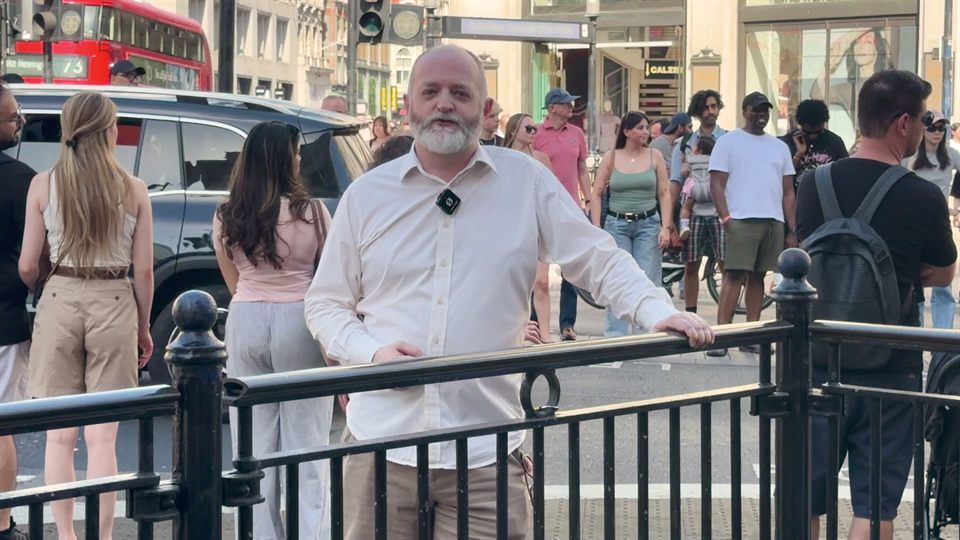
Beyond that: film with the light on your face rather than behind you, get reasonably close for the sound, and if a bus or a drill goes past, wait and say it again.
Limits and answers
- What is my username?
-
Your initial and your surname, exactly as in your westminsterconservatives.org.uk
email address. Jane Smith is
jsmith. That address is either a mailbox of its own, which is what we recommend, or it forwards to your own private email. - How long can the video be?
- Five minutes of 4K is fine, about 2.5 GB, which we will break down into smaller sized shorts for socials. The platform limit is 6 GB per file.
- What file types?
-
Whatever your phone produces. iPhone
.MOVand.HEIC, Android.mp4, ordinary.jpgand.pngall work. Nothing needs compressing first. - Can I use my phone?
- Yes. The form is built for it.
- Who sees what I send?
- The political office. Your ward colleagues get the confirmation email so they know what has gone in for the ward, but only the office can open the files.
- My username is not recognised.
- Contact the political office and we will add you to the list. Only councillors and candidates can sign in.
- Can I send something on someone else's behalf?
- Sign in as yourself and note whose it is in the "anything we need to know" box, or the body text.